Workspace codes and keys
Every function has a code and every action has a key. The tables below are written from the tool’s own lists, so they are complete.
Every function code
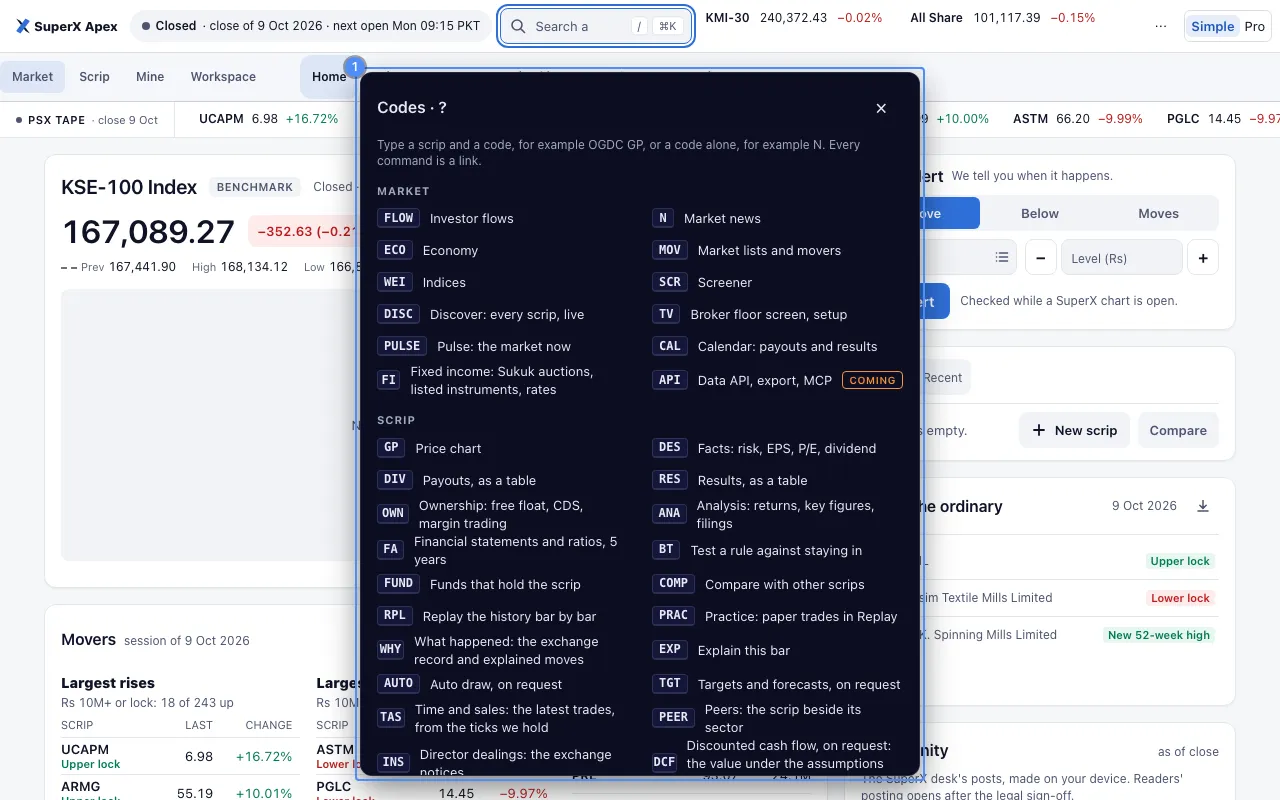
Type any of these on the command line. With a scrip, as OGDC FA. Alone for a market page, as ECO. HELP lists them in the tool, and each has a card.
| Code | Place | What it opens | Scrip | State |
|---|---|---|---|---|
GP | Scrip | Price chart | A scrip is optional | Works now |
DES | Scrip | Facts: risk, EPS, P/E, dividend | A scrip is optional | Works now |
DIV | Scrip | Payouts, as a table | A scrip is optional | Works now |
RES | Scrip | Results, as a table | A scrip is optional | Works now |
OWN | Scrip | Ownership: free float, CDS, margin trading | Needs a scrip | Works now |
ANA | Scrip | Analysis: returns, key figures, filings | Needs a scrip | Works now |
FLOW | Market | Investor flows | Works now | |
HEAT | Market | Market map: sector, then scrip, by traded value and day change | Works now | |
BRD | Market | Breadth: scrips up, down and level, with the volume on each side | Works now | |
N | Market | Market news | Works now | |
ECO | Market | Economy | Works now | |
MOV | Market | Market lists and movers | Works now | |
WEI | Market | Indices | Works now | |
SCR | Market | Screener | Works now | |
DISC | Market | Discover: every scrip, live | Works now | |
TV | Market | Broker floor screen, setup | Works now | |
FA | Scrip | Financial statements and ratios, 5 years | Needs a scrip | Works now |
PF | Mine | Portfolio, kept on this device | Works now | |
RISK | Mine | Portfolio risk: VaR, Sharpe, beta, drawdown | Works now | |
CORR | Mine | Correlation of the scrips you hold | Works now | |
OPT | Mine | Three worked mixes of your scrips | Works now | |
LIST | Mine | My list, on this device | Works now | |
ALERTS | Mine | My alerts, on this device | Works now | |
BT | Scrip | Test a rule against staying in | Needs a scrip | Works now |
FUND | Scrip | Funds that hold the scrip | Needs a scrip | Works now |
COMP | Scrip | Compare with other scrips | Needs a scrip | Works now |
RPL | Scrip | Replay the history bar by bar | Needs a scrip | Works now |
PRAC | Scrip | Practice: paper trades in Replay | Needs a scrip | Works now |
WHY | Scrip | What happened: the exchange record and explained moves | Needs a scrip | Works now |
EXP | Scrip | Explain this bar | Needs a scrip | Works now |
AUTO | Scrip | Auto draw, on request | Needs a scrip | Works now |
TGT | Scrip | Targets and forecasts, on request | Needs a scrip | Works now |
PULSE | Market | Pulse: the market now | A scrip is optional | Works now |
CAL | Market | Calendar: payouts and results | Works now | |
TAS | Scrip | Time and sales: the latest trades, from the ticks we hold | Needs a scrip | Works now |
PEER | Scrip | Peers: the scrip beside its sector | Needs a scrip | Works now |
INS | Scrip | Director dealings: the exchange notices | A scrip is optional | Works now |
DCF | Scrip | Discounted cash flow, on request: the value under the assumptions typed | Needs a scrip | Works now |
ASK | Scrip | Ask: a question about the scrip, answered with sources | Needs a scrip | Works now |
PAT | Scrip | Candle shapes and trend breaks, from the nightly job | Needs a scrip | Works now |
SEAS | Scrip | Seasonality: the mean change by month and weekday | Needs a scrip | Works now |
DEPTH | Scrip | Depth: the order book | Coming | |
WS | Workspace | Workspace tiles | Works now | |
API | Market | Data API, export, MCP | Coming | |
FI | Market | Fixed income: Sukuk auctions, listed instruments, rates | Works now |
To run a rule on a list, type OGDC BT, set Run on to My list, KSE-100 or KMI-30, and press Run on the list. Each scrip is tested on its own past bars, and a fill is at the open of the day after the rule speaks. See the rule test.
A code marked Coming names a screen that is not built. It shows no figures. A code that needs a scrip says so. A code with an optional scrip takes the scrip on screen when none is typed, as INS does: with no scrip on screen, it is the market’s list of director dealings.
What the codes without a panel open
Most codes open a panel, as Panel kinds says. These open something else.
| Code | What it opens |
|---|---|
ALERTS | The alerts saved on this device: the Alerts tab of the Mine page, #go=PF+ALERTS. |
WEI | The market summary on Home. |
TV | The setup page for Apex TV. |
FUND | The Analysis panel, scrolled to its funds section. |
COMP | The scrip’s chart with Compare open. |
RPL | The scrip’s chart with Replay open. |
PRAC | The scrip’s chart with Practice open. |
WHY | The scrip’s chart with the Why it moved card. |
EXP | The scrip’s chart with Explain open. |
AUTO | The scrip’s chart with the on-request section that Drawing describes, with its evidence and the not-advice line. |
TGT | The scrip’s chart with the second on-request section that Drawing describes, with its evidence and the not-advice line. |
PULSE | The Pulse of the market, on the chart. |
DEPTH | The order book. Coming: it is not built, and shows no figure. |
API | The data interface. Coming: it is not built. |
A chart tool opens by the press a reader makes. Nothing runs by itself. The address of each is #go=SCRIP+CODE.
Where the line sends a command
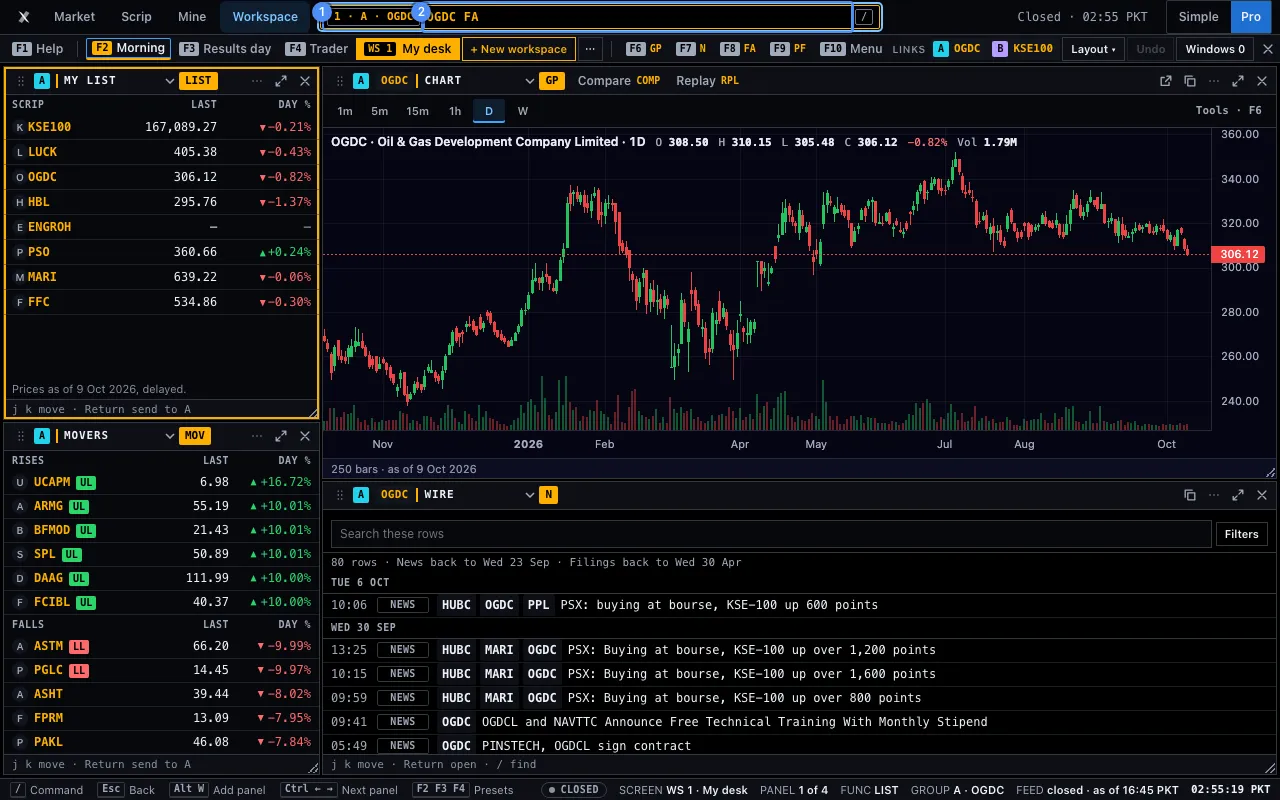
On Home, Enter opens the full page of the code. In the Workspace the line aims at the focused panel. See the command line for Enter, Shift+Enter, Alt+Enter and Ctrl+Enter.
A scrip typed alone moves the focused panel’s link group. A code typed alone keeps the panel’s scrip. The address of any line is #go=SCRIP+CODE, so every command is a link you can copy.
A line that ends in a question mark is a question, not a code. OGDC why did it fall? opens ASK with OGDC and asks at once. With no scrip first, in capitals, the question goes about the scrip in the focused panel. The question goes to the Vault only when you press Enter. It is not in the address and not in the recent lines.
Every Workspace key
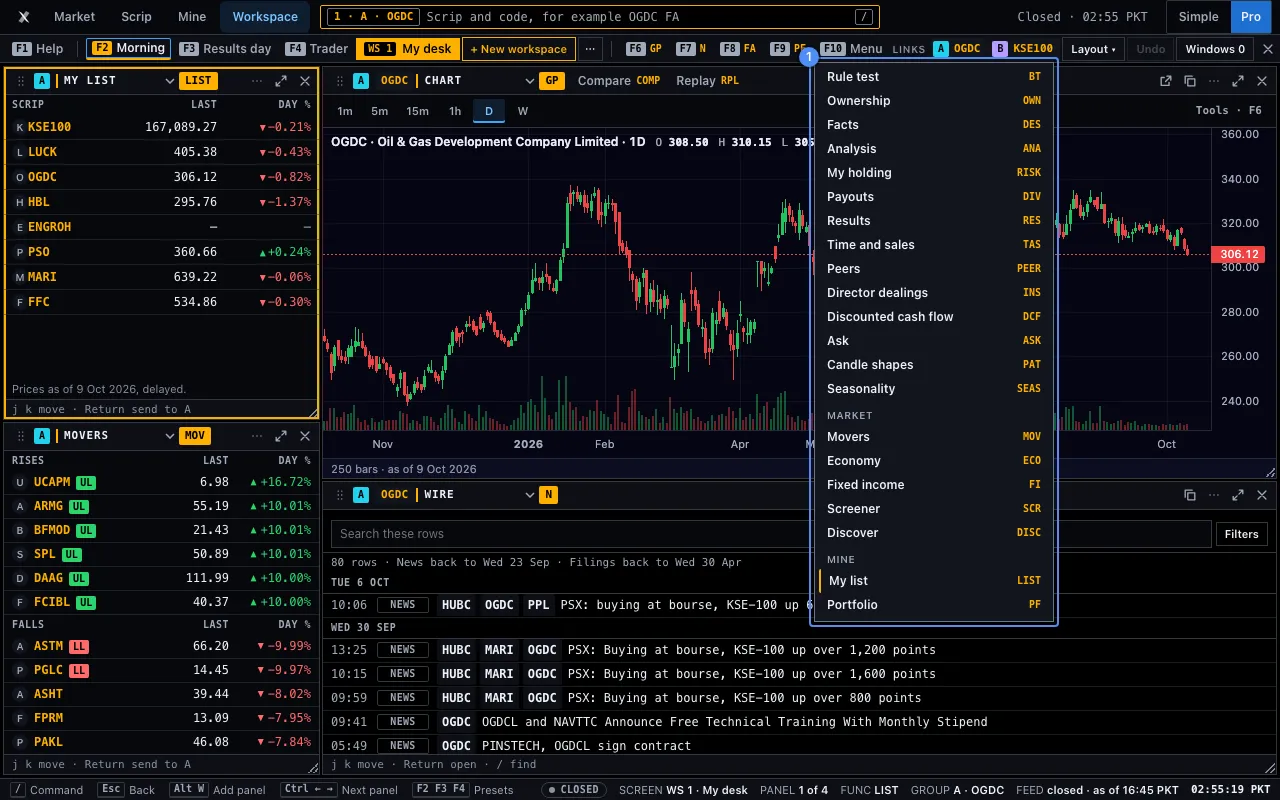
These are the keys of the command line and the Workspace. On a Mac, Ctrl is ⌘ and Alt is ⌥. A letter key acts only while no box has the focus. The chart’s own keys are on Keyboard shortcuts.
The command line
| Keys | What it does | |
|---|---|---|
| / Ctrl+K | Open the command line (the symbol search box). Ctrl is ⌘ on a Mac. | |
| ? | Typed in the line: list every code. | |
| Tab | Complete the code you are typing. A suggested code or recent line can also be pressed. | |
| ↑ ↓ | Move through the results. With the box empty: walk your last ten lines. | |
| Enter | Run the line in the focused panel (or the focused Workspace panel), or open the selected result. | |
| Shift+Enter | Open the line’s link in a new browser tab (in the Workspace it opens a tab in the focused panel). | |
| Esc | Close the search box. | |
| Esc | On a phone: close the sheet the Command key (>_) opened. |
Workspace (WS)
| Keys | What it does | |
|---|---|---|
| Enter | In the name box: save the workspace. | |
| Esc | Close the name box; then restore a maximised panel; then close the page. | |
| Alt+← Alt+→ Alt+↑ Alt+↓ | On a divider: move it one twelfth. A drag does the same and snaps to twelfths. | |
| Ctrl+← Ctrl+→ Ctrl+↑ Ctrl+↓ | Move the focus to the previous or next panel. | |
| Alt+M | Pick the focused tile up: the arrows move it a cell, Enter drops it, Esc leaves. | |
| Alt+Shift+Arrows | Size the focused tile one cell. | |
| Alt+Z | Undo a change of the tiles or of the workspaces, 10 steps (a new, closed, renamed or reset workspace, too). | |
| Alt+W | Split: open another panel next to the focused one (a tab of it when the window has no room for 260 × 180 px). On the workspace it never leaves. In a scrip’s own panel: open the workspace with that panel as panel 1. | |
| Alt+Enter | On the line, in the workspace: open what you typed as a new panel beside the focused one. | |
| Ctrl+Enter | On the line, in the workspace: open what you typed in its own window, in the focused panel’s link group. | |
| Shift+Enter | On the line, in the workspace: open a new tab in the focused panel (6 at most). | |
| ← → ↑ ↓ Enter Esc | Move tab (panel menu): ← and → choose the panel, ↑ and ↓ the place (stack, or an edge), Return drops it, Esc leaves. Dragging a tab does the same. | |
| J K | Move between the rows of the focused panel (a list, Movers, the Wire). Return acts on the row; / in a Wire panel finds in it. | |
| Esc | In an Economy, Fixed income, Screener or Discover panel: nothing. The page stays in its panel. | |
| F1 | Help for the focused panel’s function: what it opens, its scrip rule and related codes. Esc closes it. HELP alone lists every code. | |
| F6 | Chart (GP) in the focused panel. On a chart panel: open the full chart page with the same scrip, interval and range, in Pro. | |
| F7 F8 F9 | Filings (N), Statements (FA) or Portfolio (PF) in the focused panel. The scrip stays. | |
| ↑ ↓ Esc | In the F10 menu: move between the functions; Esc closes it and leaves the workspace open. | |
| F10 | Menu: every function for the focused panel, by place. The arrows move, Esc closes. Inside a chart panel the keys F1 to F10 reach the workspace. | |
| / | Focus the command line in the top row (Terminal look), from any panel and from inside a chart panel. | |
| Ins Ctrl+K | Open the tile library, or close it. Ctrl K puts its search field in the focus; ↑ ↓ choose a row, Enter adds the tile at the suggested cell, Space picks it up (the arrows move it, Enter drops it), Esc closes the library. Ctrl is ⌘ on a Mac. | |
| Esc Enter Tab | In the command line: Esc clears it and leaves; Return runs the line; Tab completes the code. | |
| Alt+W | On a chart page opened by Maximise (Pro, 1280 px or more): Restore. Go back to the workspace with this chart as panel 1. | |
| F2 F3 F4 | Open the Morning, Results day or Trader workspace, or make it. A desk you changed is never replaced. Only when no field has the focus. |
Keys inside a panel
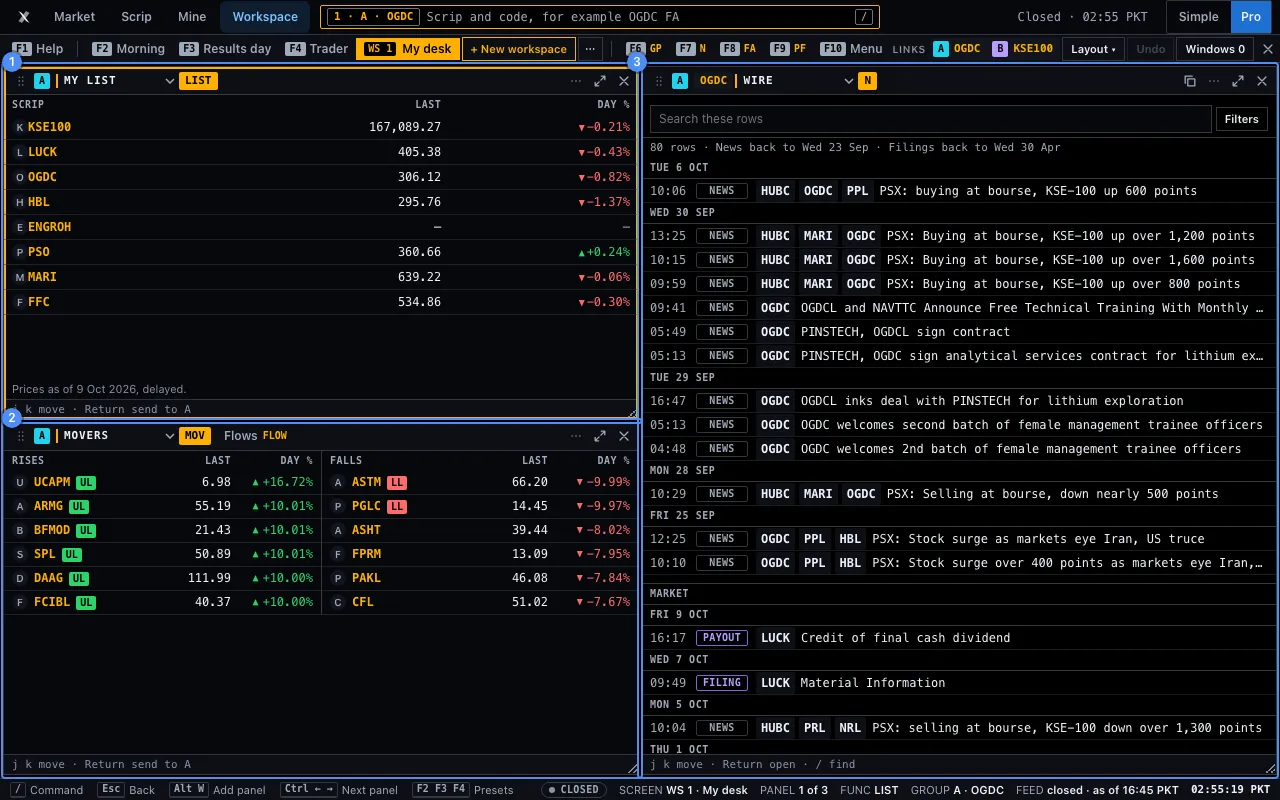
The foot of the focused panel, 20 px high, names the keys that work in it.
| Panel | Keys | What they do |
|---|---|---|
| My list, Movers | J K Enter | Move down and up the rows. Return sends the row’s scrip to the group. |
| Wire | J K Enter / | Move between rows, open a row, and go to the search box. |
| Chart (full) | I C A R | Indicators, Compare, Alerts and Replay. |
| Statements | ← → | Move between Income, Balance, Cash and Ratios. |
| Portfolio | N / ↑ ↓ E Del | New holding, search a scrip, select a row, edit it and remove it. |
| Economy, Fixed income, Screener, Discover | their own | The page’s own keys, in its panel. Esc does nothing there: the page stays in its panel. |
Menus and lists follow one rule: the arrows move, Enter picks and Esc closes and returns the focus.