Alerts
An alert tells you when something happens on a symbol. A SuperX Charts tab checks it while it is open. The server checks it too, if you turn that on.
Set a price alert

- In Pro, click Alerts or press A.
- Choose Price level in Alert on 1.
- Type the price. Choose rises to, falls to or crosses, either way.
- Choose Once, or Every time (at most once a bar).
- Click Set alert 2.
The alert shows in the list with its state: armed, or fired and when.
A right-click on the chart offers a new alert at that price.
An alert on a drawing’s line
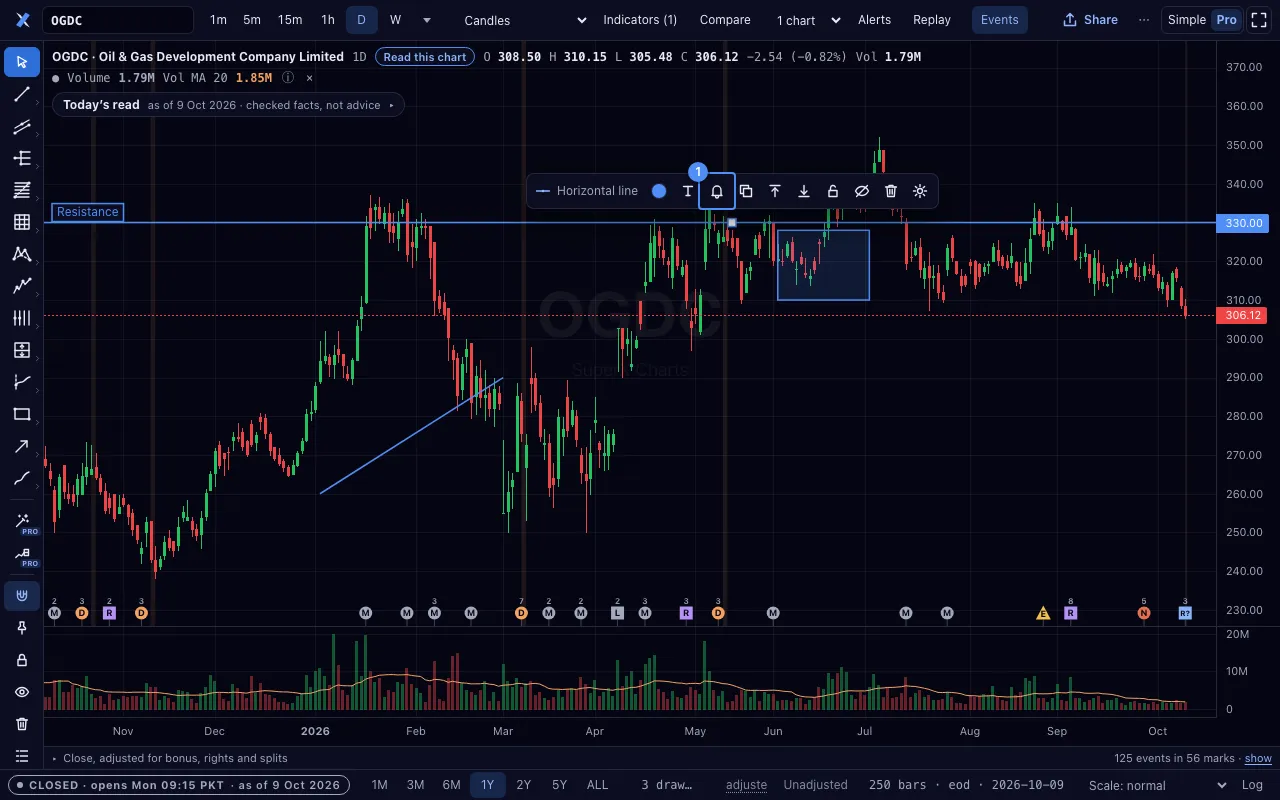
- Draw a line, a ray or a channel.
- Click it to select it.
- Click the bell 1 in the bar over it.
The alert fires when the close crosses the line. A line that ends before the newest bar has nothing to cross. A ray or an extended line runs on to the right.
Other kinds of alert

| Kind | It fires when |
|---|---|
| Price level | the price rises to, falls to or crosses a level |
| A drawing’s line | the close crosses the line |
| Indicator (Formula) | a formula is true on a bar, for example rsi(close, 14) > 70 |
| Percent move | the price moves a percent from the previous close or from today’s open |
| Volume spike | the volume reaches a multiple of its average |
| Circuit limit | the price is at its upper or lower limit |
| Results and filings | a new results filing, dividend, book closure, notice or news item appears |
An alert from a sentence
- Type a sentence in Plain-language alert 1, in English or Roman Urdu.
- Click Read it. The panel shows what it understood.
- Click Arm this alert when it is right.
For example: “tell me if HBL closes above its 200-day average”.
Moves on your list

A switch in the watchlist panel, off at first, sets one server alert for each symbol on your list: a move of 5 % from the previous close, once a session.
In Simple, the ⋯ menu has Save to my list and Remove from my list.
Your own alerts come first within the limit of 200 alerts a device.
Alerts when the tab is closed

- In the Alerts panel, turn on Notify me when the tab is closed 1.
- Allow notifications when the browser asks.
- Click Send a test. A test notice arrives.
The server then checks your alerts on its own bars and sends a notice to this browser.
Each alert says on the server or in this tab only, with the reason. A formula alert is checked in the tab only. A line on 2-hour or longer intraday bars is too.
The server holds at most 200 alerts for each device. Turning the switch off deletes them from the server at once.
iPhone and iPad
On an iPhone or iPad, a closed tab gets notices only from the Home Screen. In Safari, tap Share, then Add to Home Screen. Open SuperX Charts from there.
When an alert fires

- A notice shows in the page. With browser notifications allowed, the browser shows one too.
- Play a tone when an alert fires sounds a tone as well.
- Each row records its firings. Fired n× shows the bars.
- A Once alert stops after it fires. Arm again sets it once more.
- Remove deletes an alert.